Working with precision
Exact numbers can be entered for keyframes and handles.Updated in v1.5
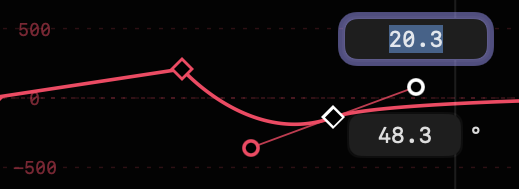
- Double-click on any keyframe to see its value (above) and time (below).
- If Absolute Timing is active in Settings, the time value will be shown as a number of frames (editable) and also below that field as abbreviated timecode.
New in v1.1
- If Absolute Timing is active in Settings, the time value will be shown as a number of frames (editable) and also below that field as abbreviated timecode.
- Double-click on any handle to see its distance (above) and angle (below).
- Double-click on any value in the under-graph settings to change that value.
New in v1.5 - Double-click on graph limit values to change them.
New in v1.5 - In all these cases, type in new values to change them, then approve the change by pressing
RETURNorENTER, or cancel the change withESCAPE. - Alternatively, use up and down arrows to change the values by 1,
SHIFT-up andSHIFT-down arrows to change the values by 10, andNew in v1.1OPTION-up andOPTION-down arrows to change the values by 100. - When using up and down arrows to change values, changes are immediately visible.
New in v1.1 - When numeric entry is active or when the under-graph values are being edited, use left and right arrows to move to the previous or next keyframe or handle.
New in v1.5 - If the playhead is over a keyframe (for example if the graph name has just been clicked to create a new keyframe) then clicking the property name activates numeric entry.
New in v1.1