
Selecting, moving and scaling keyframes
Multiple keyframes can be selected and manipulated.
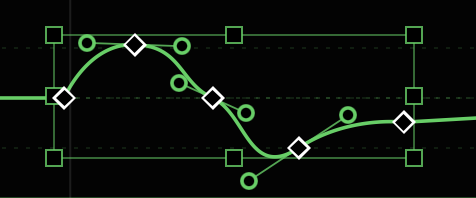
- Clicking a keyframe selects it.
SHIFT-clicking additional keyframes selects additional keyframes.- Drag from empty space across one or more keyframes to create a selection marquee that selects enclosed keyframes.
- Hold
SHIFTas you drag a selection box to select additional keyframes. - When multiple keyframes have been selected, a bounding box appears that allows the selected keyframes to be scaled and/or moved.
- Drag one of the selected keyframes to move them, or drag the sides or corners of the bounding box to move the contained keyframes proportionally to one another.
- When resizing a group of keyframes, handles also resize proportionally.
New in v1.1 - Hold
SHIFTas you drag one of multiple selected keyframes to constrain to horizontal or vertical movement. - Right-click to delete, copy, or perform other operations on multiple keyframes at once.
- Click elsewhere in the graph to dismiss the bounding box.