
Using the graph menu
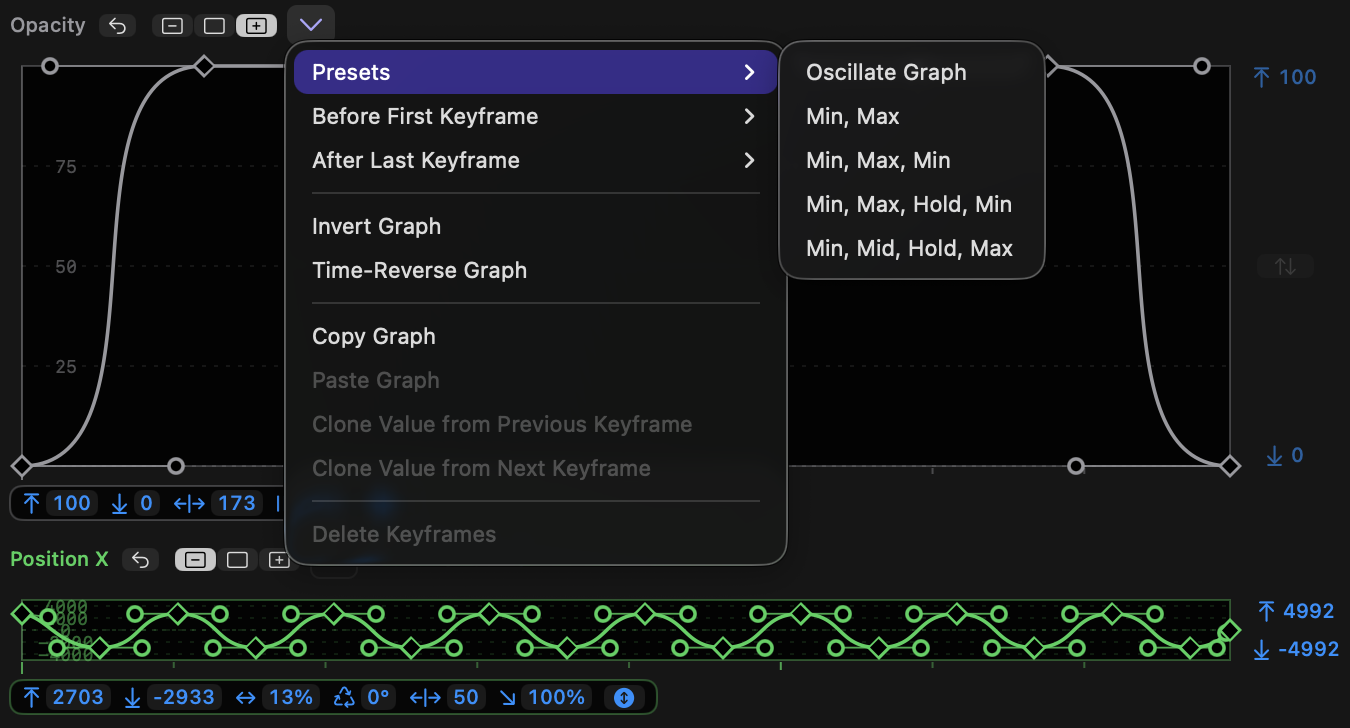
Each graph has a menu that enables some advanced features.
-
The graph menu can be accessed by the menu to the right of the toggle buttons, or by right-clicking on the graph.
-
Many of these menu options are context-sensitive. If you select one or more keyframes, those keyframes will be affected. If no keyframes are selected, the entire graph is affected.
-
When a single keyframe is selected, use
Clone Value from Previous KeyframeorClone Value from Next Keyframeto simulate a Hold keyframe. -
If no keyframes are selected, an entire graph can be reversed in time by choosing
Time-Reverse Graph, or flipped vertically by choosingInvert Graph. -
If two or more contiguous keyframes are selected, they can be reversed by choosing
Time-Reverse Keyframes, or flipped vertically by choosingInvert Keyframes. -
Use
Copy KeyframesorCopy Graphto copy keyframes from a graph. -
Use
Paste KeyframesorPaste Graphto paste copied keyframes from one graph into another graph. One or more keyframes must be selected for Paste Keyframes to be available. -
Clone Value from Previous KeyframeandClone Value from Next Keyframechange the value of the selected keyframe to the value of a neighbouring keyframe. -
Presets and Before First Keyframe and After Last Keyframe are discussed in the following sections.