
Easing
Allowing predictable curve patterns to be used across one or more keyframes. New in v1.1
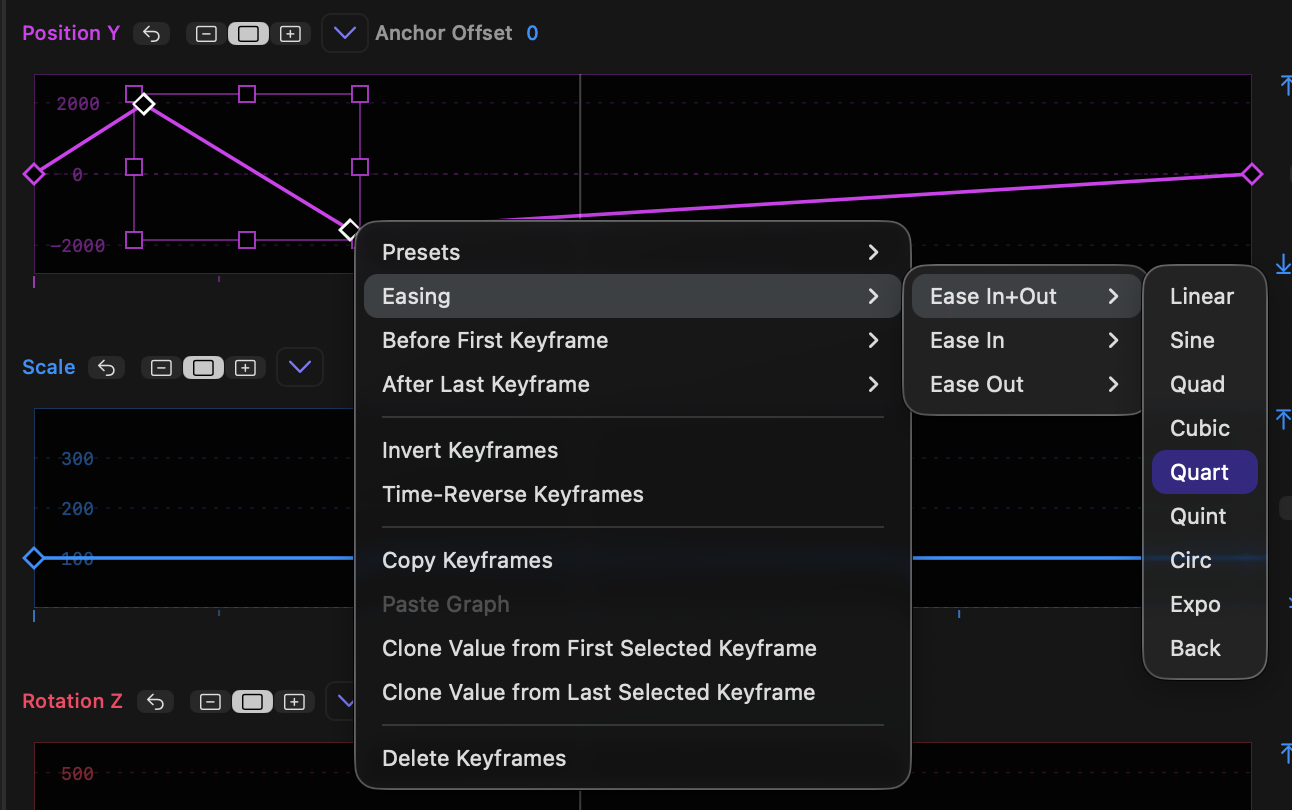
- The graph menu and the right-click menu both contain an Easing submenu.
New in v1.1 - The Easing submenu can be used in two contexts: referring to curves, and referring to handles on a keyframe. To refer to curves, select two or more keyframes before choosing the Easing submenu; to refer to handles on a keyframe, select just one keyframe before choosing the Easing submenu.
- If two or more keyframes are selected, easing affects the curves between the selected keyframes, so any handle before the first selected keyframe or after the last selected keyframe will be ignored.
- In this mode, options include Ease In+Out, Ease In and Ease Out.
- All options here affect the handles on both sides of each selected curve.
- However, if a single keyframe is selected, these menu items now refer to the handles around that keyframe. The submenu items change to reflect this, and now read Ease Left+Right, Ease Left and Ease Right.
- Ease Left means the handle to the left of the keyframe and Ease Right means the handle to the right of the keyframe.
- Each submenu contains:
- Linear
- Sine
- Quad
- Cubic
- Quart
- Quint
- Circ
- Expo
- Back
- For an illustration of how these graphs should appear, refer to https://easings.net.
- Important: The easing curves shown here refer to the curve between two keyframes, not to the handles on a keyframe.
To help you visualise thes options, here's an example of all these easings (plus a custom example made by hand) applied to Position X.