# On-screen controls
On-screen controls (OSC) allow you to click on drag in the viewer to create or delete keyframes. `New in v1.3`
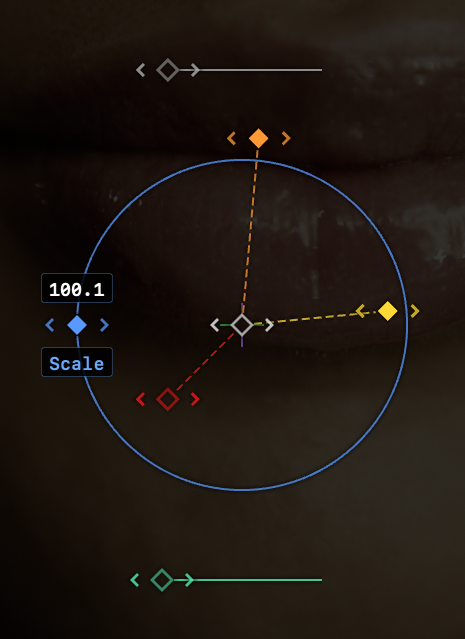
- **Labels** appear while the diamonds are dragged.
- Position is in the centre, Rotation Z/X/Y are on spokes, Scale has a circle, Opacity is above and Blur is below.
- **Click or drag the colour-matched diamonds to create a new linear keyframe** at the current time on any visible property.
- **Command-click or drag an OSC diamond to create a new keyframe with easing handles** applied.
- **Keyframe diamonds are now filled if they are at the current playhead position**, in the OSC and in the graphs.
- **Click a filled keyframe diamond in the OSC to delete that keyframe**. (This doesn’t happen in the graph.)
- **Click the previous/next buttons around each keyframe to jump to the neighbouring keyframes** on that property.
- **Hold `CAPS LOCK` while adjusting Position keyframes to constrain movement** to only one dimension and only create a keyframe on that graph.
- **Motion paths are shown**, using diamonds to indicate keyframe positions (on X, Y, or both) and white dots to indicate tweened frames.
- **On-screen controls can be instantly hidden** by activating the Live/OSC mode, using Caps Lock. (Note that the Live Scrubbing button in the Inspector has been renamed.)
- If you prefer not to see the OSC at all, it can be disabled in Settings.