# Non-linear (smooth) keyframes
Handles connected to keyframes control the graph curve that controls how one value changes into another.
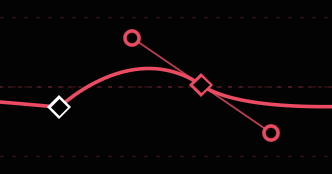
- **`OPTION`- or `COMMAND`-drag on a line** to add a non-linear keyframe, dragging out two symmetric handles to create a Bezier curve.
- **`OPTION`- or `COMMAND`-drag on a keyframe** to add handles to a linear keyframe, or reset and redraw the handles on an existing non-linear keyframe.
- Optionally, hold `SHIFT` while doing this to lock the curve to horizontal (0°).
- **`OPTION`- or `COMMAND`-click on a keyframe** to remove handles and reset the keyframe to linear.
- **`OPTION`- or `COMMAND`-drag on a handle** to split a handle pair and make it asymmetric.
- **`SHIFT`-drag a handle** to maintain its current angle and only change distance.